


Summarize This Article With AI
There are several powerful tools available to SEO professionals, digital marketers, researchers, content creators, and anyone using Google that are seldom used and underutilized: Google Search Operators. Advanced users use Google Search Operators to get more specific information, to find SEO opportunities, to analyze competitors and to audit their own websites.
Google Search Operators can make your search results much better and more accurate whether you are seeking guest posting opportunities, comparing competitor content, finding indexed pages or searching for downloadable PDFs.
In this complete guide, you will find out what is Google Search Operators, how they work, the full list of Google Search Operators, examples, SEO uses, advanced ones and some common errors.
What Are Google Search Operators?
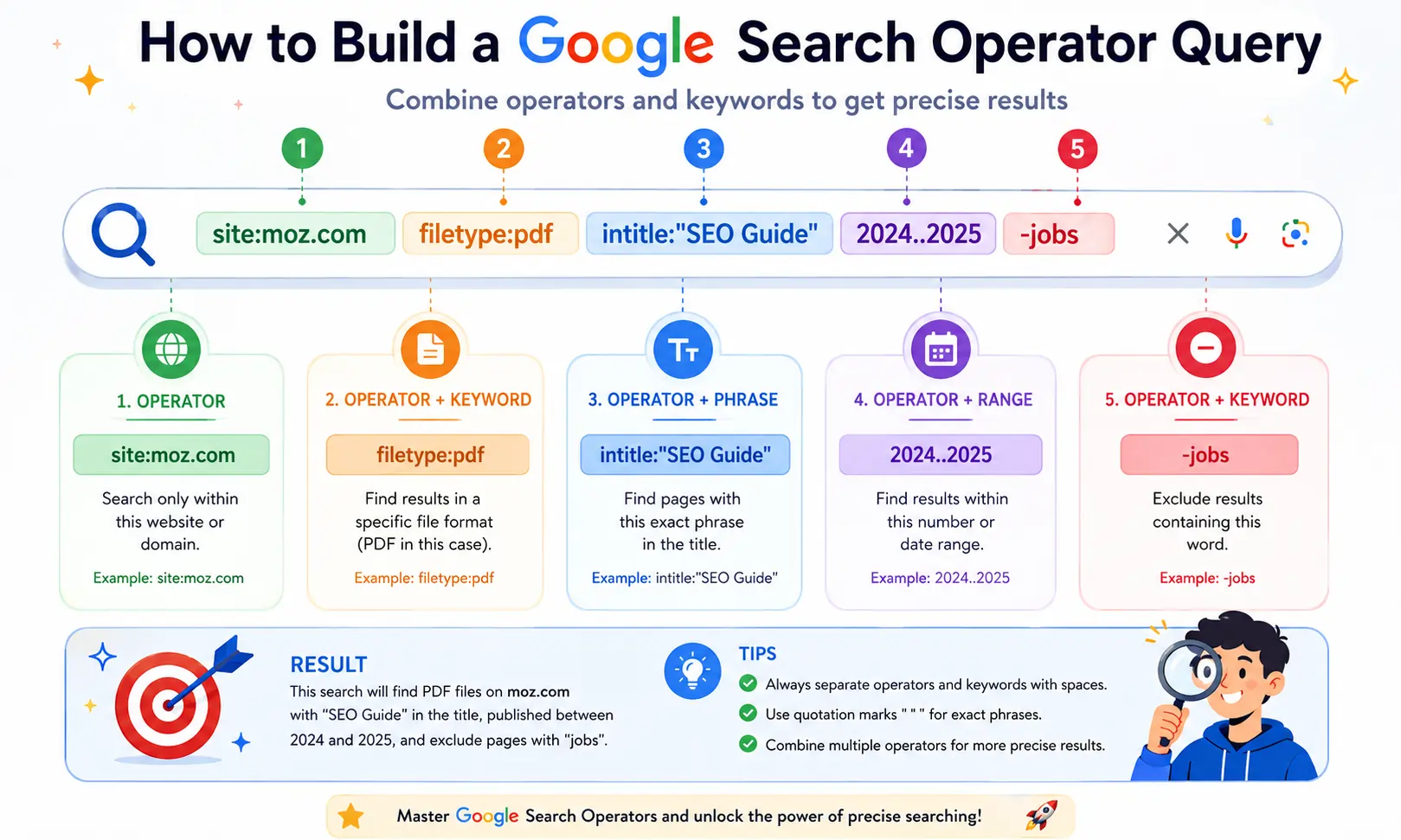
Google search operators are unique commands, symbols, and search syntax that enable users to be more specific in their Google search queries and to narrow their search results.
These operators are used to get very specific results from Google when looking for something. As a result, you can go through hundreds or thousands of pages and not have to spend time sifting through the garbage to find what you are looking for.
For example:
site:example.com SEO
This search instructs Google to only show pages from example.com with the word “SEO”.
Similarly:
“best digital marketing agency”
Searches those pages with the exact word phrase and not pages that have those words on their own.
Google Search Operators are often referred to as:
- Google Search Commands
- Advanced Google Search Operators
- Google Search Syntax
- Search Operators in Google
- Advanced Google Search Techniques
These commands may be used in isolation or in conjunction with each other to achieve very specific searches.
Why Use Google Search Operators?
The vast majority of Google users don’t know all of the things that Google can do. Advanced Google Search Operators are a more efficient and effective means of locating information.
Benefits include:
Better Search Accuracy
The operators give operators the ability to narrow down the search to the exact result you want rather than broad search results.
Faster Research
Researchers and marketers can find relevant information in a quick and easy way without having to filter the results themselves.
Competitor Analysis
Operators are the tools a SEOs can use to gain insight into competitor websites, uncover content strategies, and identify ranking opportunities.
Technical SEO Audits
The operators can show indexing problems, duplicate pages, unsecured URLs, and other technical issues.
Link Building Opportunities
Search operators are useful for narrowing down the search for guest posting websites, resource pages, and backlink opportunities.
Content Research
Advanced search operators are valuable for writers and content marketers to find trending topics and get information from authoritative sites.
Complete Google Search Operators List
If you’re looking for some quick tips on Google Search Operators, here’s a Google Search Operators Cheat Sheet.
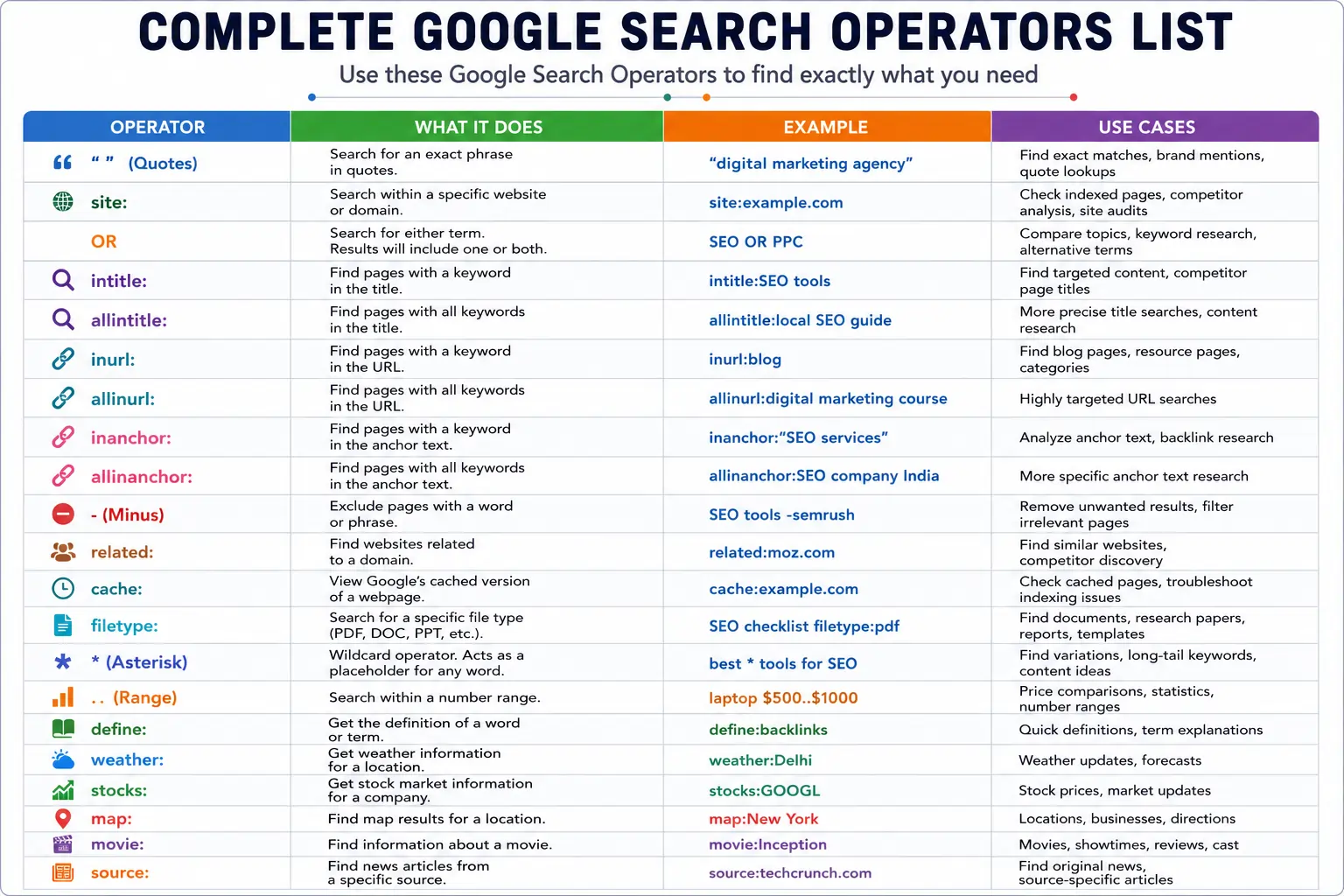
Let’s take a closer look at each of the operators.
1. Quotes (” “) Operator
One of the most used Google Search Operators is the quotation mark operator.
It makes Google show pages that have the exact phrase that is in the quotation marks.
Example:
“Google Search Operators”
If you don’t include these terms in your query, Google could show you pages that have the word Google, the word Search, and the word Operators all in different sentences.
Google will only return pages that have the exact phrase in the quotes.
SEO Use Cases
- Duplicate content checks
- Finding content syndication
- Brand mention tracking
- Exact keyword research
Example Search
“Indian SEO Agency”
This can help you determine where your brand is mentioned online.
2. site: Operator
Site: operator narrows down search results to a particular website or domain.
Example
site:indianseoagency.com
This displays every page on your site that is indexed.
Why SEOs Use It
One of the most beneficial Google Search Operators for SEO is the site: operator. It can be useful for:
- Check indexed pages
- Identify duplicate URLs
- Find missing content
- Audit website structure
Additional Examples
site:indianseoagency.com SEO
site:indianseoagency.com/blog
site:gov.in digital marketing
The operator can be also used with other search operators to perform more complex analysis.
3. OR Operator
The OR operator will return results that have either one term or another.
Example
SEO OR PPC
Google will show pages that have SEO, PPC or both.
When to Use
- Topic comparisons
- Keyword research
- Alternative search phrases
Example
Google Business Profile” OR “local SEO”
This can help find content about either of these topics.
4. intitle: Operator
intitle: returns a list of pages that have a specific word in the title.
Example
intitle:SEO
Google shows pages that have SEO in the title.
Why It Matters
One of the strongest ranking factors for Google is page title.
To find titles, search for:
- Ranking competitors
- Content opportunities
- Keyword competition
Example Searches
intitle:”local SEO”
intitle:”Google Search Operators”
intitle:”keyword research”
This is particularly helpful in terms of content gap analysis.
5. allintitle: Operator
The allintitle: operator must have all of the terms listed in the page title.
Example
allintitle: local SEO checklist
The results will include all 3 words in its title.
Benefits
- More precise than intitle:
- Useful for keyword competition analysis
- Great for content planning
SEO Example
allintitle: Google Search Operators
This aids to identify the number of pages that are targeting that specific keyword phrase.
6. inurl: Operator
The inurl: keyword operator checks for keywords in the URL.
Example
inurl:blog
This shows the URLs that feature the term blog.
Common Uses
- Finding blog sections
- Identifying resource pages
- Finding category pages
SEO Example
inurl:SEO
This could be a sign of guest posting opportunities.
7. allinurl: Operator
The allinurl: operator will only return the results of pages with all the words listed in the URL.
Example
allinurl: local SEO guide
Benefits
- More specific URL search results.
- Better competitor analysis
- Stronger content research
Example
allinurl:Digital marketing agency
Returns URLs containing all these terms.
8. inanchor: Operator
The inanchor: operator looks for pages that have incoming links with an anchor text equal to a specific word.
Example
inanchor:”SEO services”
Why It’s Useful
This operator is used by SEOs to:
- Analyze anchor text
- Discover backlink patterns
- Analyze competitor link profiles
Google isn’t offering full visibility of all links, but this operator will still give you some helpful information.
9. allinanchor: Operator
The allinanchor: operator must have every specified word in the anchor text.
Example
allinanchor: SEO company India
This is an operator that is frequently used with advanced link research and competitor analysis.
10. Exclusion (-) Operator
The minus (-) operator can be used to exclude unwanted results from your search query. When a keyword has multiple meanings, this is one of the easiest and most helpful Google Search Operators.
Example
apple -fruit
This search will display Apple Inc. related pages but not fruit related pages.
SEO Applications
- Eliminate irrelevant results in keyword research
- Prevent competitors from showing up in searches.
- Unwanted content types are filtered out.
Examples
SEO tools -Semrush
digital marketing -jobs
speech therapy -career
Exclusions can be used to restrict search results and only show relevant information.
11. related: Operator
The related: operator can be used to locate websites that are similar to a particular domain.
Example
related:semrush.com
The other websites that are similar to Semrush will appear in Google.
So, why do SEO professionals use it?
This operator is very useful for:
- Competitor research
- Discovering industry websites
- Finding partnership opportunities
- Building outreach lists
Example Searches
related:moz.com
related:ahrefs.com
related:searchenginejournal.com
This operator can help you find sites in your niche that you might not have otherwise found.
12. cache: Operator
Cache: displays the way Google has cached a webpage.
Example
cache:indianseoagency.com
Google will display the newest version of the page that is cached.
Why It Matters
Google’s cached pages are useful to determine:
- If Google has been crawling a page, then:If yes, then:
- If there have been recent updates, they have been indexed.
- What the page looks like when it is accessed via a search engine.What the page would look like when users visit via a search engine.
Technical SEO Use Cases
- Verify indexing status
- Check content updates
- Diagnose crawling issues
While Google is more reliant on live crawling today, the cache operator can still be useful for troubleshooting.
13. Wildcard (*) Operator
The wildcard (*) represents an unknown word.
Example
best * tools for SEO
Google will complete the missing word with suitable words.
Possible results:
- Best free tools for SEO
- Best AI tools for SEO
- Best keyword tools for SEO
Benefits
- Discover keyword variations
- Find long-tail keywords
- Explore content ideas
- Improve topic research
Additional Examples
how to * backlinks
best * marketing strategies
top * SEO tools
This operator is especially helpful if you don’t know exactly what phrase you are looking for.
14. Number Range (..) Operator
Use the range operator to search for numbers in a range.
Example
laptop ₹30000..₹50000
Google shows products in that price range.
SEO Applications
While commonly used for shopping, marketers can use this operator to:
- Analyze pricing strategies
- Compare competitor pricing
- Research industry statistics
Examples
SEO statistics 2024..2026
iPhone 13 ₹40000..₹60000
digital marketing courses ₹10000..₹50000
15. filetype: Operator
The filetype: operator looks for specific files like PDF, PPT, DOC, XLS and others.
Example
SEO checklist filetype:pdf
Google will return PDF files that pertain to SEO checklists.
Common File Types
- DOC
- DOCX
- XLS
- XLSX
- PPT
- PPTX
SEO Benefits
This is one of the most valuable Google Search Operators for SEO.
You can find:
- Industry reports
- Research papers
- Whitepapers
- Marketing templates
- Case studies
Examples
-
digital marketing filetype:pdf
-
Click on the SEO audit template filetype:xlsx
-
link building guide filetype:ppt
This operator is employed by many marketers to discover useful information that is not shown in the regular search results.
16. define: Operator
Define: is a special operator to show definitions straight in Google.
Example
define:SEO
Google will show you the definition of SEO and other terms.
Uses
- Quick definitions
- Terminology research
- Industry jargon explanations
Examples
define:backlinks
define:keyword cannibalization
define:search intent
This is an operator that is particularly useful to SEO novices and those taking up digital marketing concepts.
17. weather: Operator
The weather: operator displays weather data for a particular area.
Example
weather:Toronto
Google shows the weather, weather forecast and temperature.
Examples
weather:Delhi
weather:New York
weather:London
This operator is used to display Google’s weather widget directly in search results.
18. stocks: Operator
The stocks: operator is used to get information about the stocks from the stock market.
Example
stocks:GOOGLE
Google shows stock performance information and charts.
Useful For
- Investors
- Business analysts
- Financial researchers
Examples
stocks:MSFT
stocks:AAPL
stocks:NVDA
19. map: Operator
The map: operator shows the search results that are displayed on the map.
Example
map:Mississauga
Google will display map searches pertaining to Mississauga.
Local SEO Applications
This operator is useful for businesses to know how visible their search results are in their local area, and how relevant their content is to the location.
20. movie: Operator
The movie: operator provides information about movies.
Example
movie:Inception
Google may display:
- Showtimes
- Reviews
- Streaming platforms
- Cast details
It isn’t a search term that’s often utilized in SEO, but it does show Google’s capability of providing specialized search results.
Google Search Operators for SEO
You have now learned the most crucial Google Search Commands, and now you will learn how the SEO professionals use them everyday.
Find Indexed Pages
One of the most widely used Google Search Operators for SEO is to check indexed pages.
Example
site:yourwebsite.com
This shows Google’s index of the pages.
Why It’s Useful
- Verify indexing
- Discover unwanted pages
- Identify duplicate content
Find specific content sections.
Example
site:yourwebsite.com/blog
This will show all indexed blog pages.
Benefits
Content audits
Indexation analysis
Performance tracking
Find Duplicate Content
Example
“exact paragraph from article”
Google will display pages containing the same text.
Why It Matters
Duplicate content can impact rankings and dilute authority.
Using quotation marks helps locate copied content quickly.
Find Guest Posting Opportunities
Guest post prospecting is one of the most popular Google Search Operator uses.
Examples
SEO “write for us”
digital marketing “guest post”
SEO “become a contributor”
marketing “submit article”
These searches show Web sites that are currently open for guest articles.
Find Resource Pages
These resource pages can offer great link opportunities.
Examples
SEO intitle:resources
SEO inurl:links
Digital marketing “useful resources”
These pages are great places to do outreach campaigns.
Google Search Operators for Competitor Analysis
Advanced Google Search Operators make competitor research a lot easier.
Discover Competitor Pages
site:competitor.com
Analyze Blog Content
site:competitor.com/blog
Find Topical Authority
site:competitor.com SEO
Google Search Operators for Backlink Analysis
Google doesn’t give you all the backlink information, but operators are a great way to find opportunities.
Brand Mention Search
“Indian SEO Agency” -site:indianseoagency.com
This shows you what mentions of your brand are happening on the web.
Benefits
- Find unlinked mentions
- Discover outreach opportunities
- Build backlinks
Competitor Brand Searches
“competitor name” -site:competitor.com
This can expose websites that are talking about your rivals.
Google Search Operators for Technical SEO Audits
Advanced Google Search Operators are very useful in technical SEO.
Find PDF Files
site:yourwebsite.com filetype:pdf
Find Login Pages
site:yourwebsite.com inurl:login
Find Staging URLs
site:yourwebsite.com inurl:staging
Find Tag Pages
site:yourwebsite.com inurl:tag
Find Category Pages
site:yourwebsite.com inurl:category
These searches can be used to identify pages that could be optimized or removed.
Google Search Operators That No Longer Work
The following operators have been removed from support: some that were previously supported by Google.
Examples include:
- link:
- info:
- ~
- phonebook:
There are still a lot of old blogs that refer to these operators.
Double check the functionality of the operators before using them in any process.
Common Mistakes When Using Google Search Operators
Using Incorrect Spacing
Correct:
site:example.com
Incorrect:
site : example.com
Expecting Exact Results
Google still uses relevance filters and ranking algorithms.
Using Deprecated Operators
Some of the older commands do not work as expected.
Overcomplicating Searches
Begin with simple and build up operators over time.
Here is Google Search Operators Cheat sheet
| Operator | Description | Use Case Example |
|---|---|---|
" " |
Search for an exact phrase match. | "digital marketing strategies" |
- |
Exclude a specific word from search results. | SEO techniques -backlinks |
* |
Wildcard to replace unknown words or phrases. | most important SEO * |
.. |
Search within a range of numbers. | Samsung phone ₹25000..₹42000 |
OR |
Search for either one term or another. | SEO OR SEM |
site: |
Search only within a specific website or domain. | site:nytimes.com COVID-19 |
-site: |
Exclude results from a specific website or domain. | AI -site:wikipedia.org -site:wiktionary.org |
define: |
Get the definition of a word or phrase. | define:marketing |
filetype: |
Search for specific file types like PDF, PPT, DOC. | digital marketing trends filetype:pdf |
related: |
Find websites similar to a given domain. | related:amazon.com |
cache: |
View Google’s cached version of a webpage. | cache:google.com |
inurl: |
Search for pages with a specific word in the URL. | inurl:blog ecommerce trends |
allinurl: |
Search for pages with multiple words in the URL. | allinurl:SEO trends |
intitle: |
Search for pages with a specific word in the title. | intitle:SEO techniques |
allintitle: |
Search for pages with multiple words in the title. | allintitle:backlink tracking sheet |
intext: |
Search for pages with a specific word in the content. | intext:"SEO best practices" |
allintext: |
Find pages where all specified keywords appear in the body text. | allintext:SEO techniques guide |
weather: |
Show weather conditions and forecasts for a location. | weather:Prague |
stocks: |
Get stock information for a company ticker. | stocks:GOOGL |
movie: |
Search for movie reviews, showtimes, and related information. | movie:"Parasite" |
currency: |
Convert between two currencies. | currency:USD to INR |
AROUND(X) |
Find two terms within X words of each other. | SEO AROUND(3) strategies |
author: |
Search for content by a specific author. | author:John Doe |
source: |
Search Google News articles from a particular source. | Apple source:The_Verge |
map: |
Show map results for a location. | map:Mumbai |
Frequently Asked Questions (FAQs)
1. What are Google Search Operators?
Google Search Operators are special search operators and symbols that assist users narrow down search results and get very specific information about Google.
2. What are the best Google Search Operators for SEO?
The most helpful operators are site:, intitle:, inurl:, filetype:, related: and quotation marks (“”).
3. Can Google Search Operators help with keyword research?
Yes. These tools can be used to find keyword opportunities, competitor analysis, and content gaps.
4. How to check indexed pages in Google?
Use:
site:yourwebsite.com
This shows the pages which Google is currently indexing.
5. Are Google Search Operators free of charge?
Yes. Any Google Search Operator is free and accessible to all Google Search users.
6. Do Google Search Operators still work in 2026?
Most of the big operators are still live, but some older operators have been removed from Google.
Conclusion
Google Search Operators are an indispensable tool for smart searching and efficient working online. These are powerful Google Search Techniques that can save hours of manual work—from searching for exact phrases to finding competitor strategies to performing a technical SEO audit to finding backlink opportunities and more.
As a SEO professional, a digital marketer, a business owner, a researcher or as a student you should know some of the most important Google search operators to make your search more accurate and to find information that most people don’t. Try them out with Google Search today, use two or more operators and you’ll realize how useful they can be in any SEO toolbox.
Also Read:
SEO for Locksmiths: Get More Calls & Grow Your Business
SEO for Dentists: How to Increase Ranking and Get More Patients