

Why is there a sudden decline in website traffic – almost overnight?
There are a few reasons for a sudden drop in traffic to a website, and they all stem from a problem with either an algorithm change, tracking, or configuration/quality of content that no longer matches what users are searching for. A traffic decline occurred in the past few days, as a result of Google’s May 2026 Core Update that has impacted the ranking of several websites and has been applied over approximately 12 days.
The right move to take in this instance is to diagnose the condition via Google Analytics and Google Search Console. If the cause is not apparent, then the best digital marketing agency in Noida can conduct a complete audit and discover what’s costing a website its positions.
Summarize This Article With AI
I’ve been getting less website traffic than usual lately, what happened?
When the traffic to your website suddenly decreases, it can happen due to a technical search engine optimization problem or due to a Google algorithm change or tracking error.
In this article, we’ll explore some of the reasons and find out why a website’s traffic has suddenly decreased.
It’s important to realize that not every traffic drop is an SEO problem.
The drop in a graph does not always indicate a drop in search rankings. Your organic traffic decrease may be caused by broken tracking codes, a halted e-mail newsletter, running-out ad campaigns, or perhaps, even a school holiday.
Temporary vs Permanent Traffic Loss
A temporary traffic loss is a v-shaped drop in the graph that usually occurs due to changes in the season, outage or software bugs on the server. A permanent loss of traffic is a continuous drop in ranking, however. It can be due to the irrelevance of content and search intent or AI search displacement.
Organic Traffic Loss vs. Overall Traffic Loss
If your traffic is only down in one channel, such as search engine or social media, then it indicates that your content was losing organic traffic. If rankings in every channel (such as search, paid ads, social media, direct links and email) are dropped, it is a sign of a total website traffic drop.
Why is it important to find out what caused the problem before trying to fix it?
SEO fixes are very specific and you need to know the reason behind a drop in your website’s rank. The discovery of the cause of ranking drop also minimizes the likelihood of the same problem from happening again.
One way to make the search simpler: compare it to the site traffic drop pattern listed below.
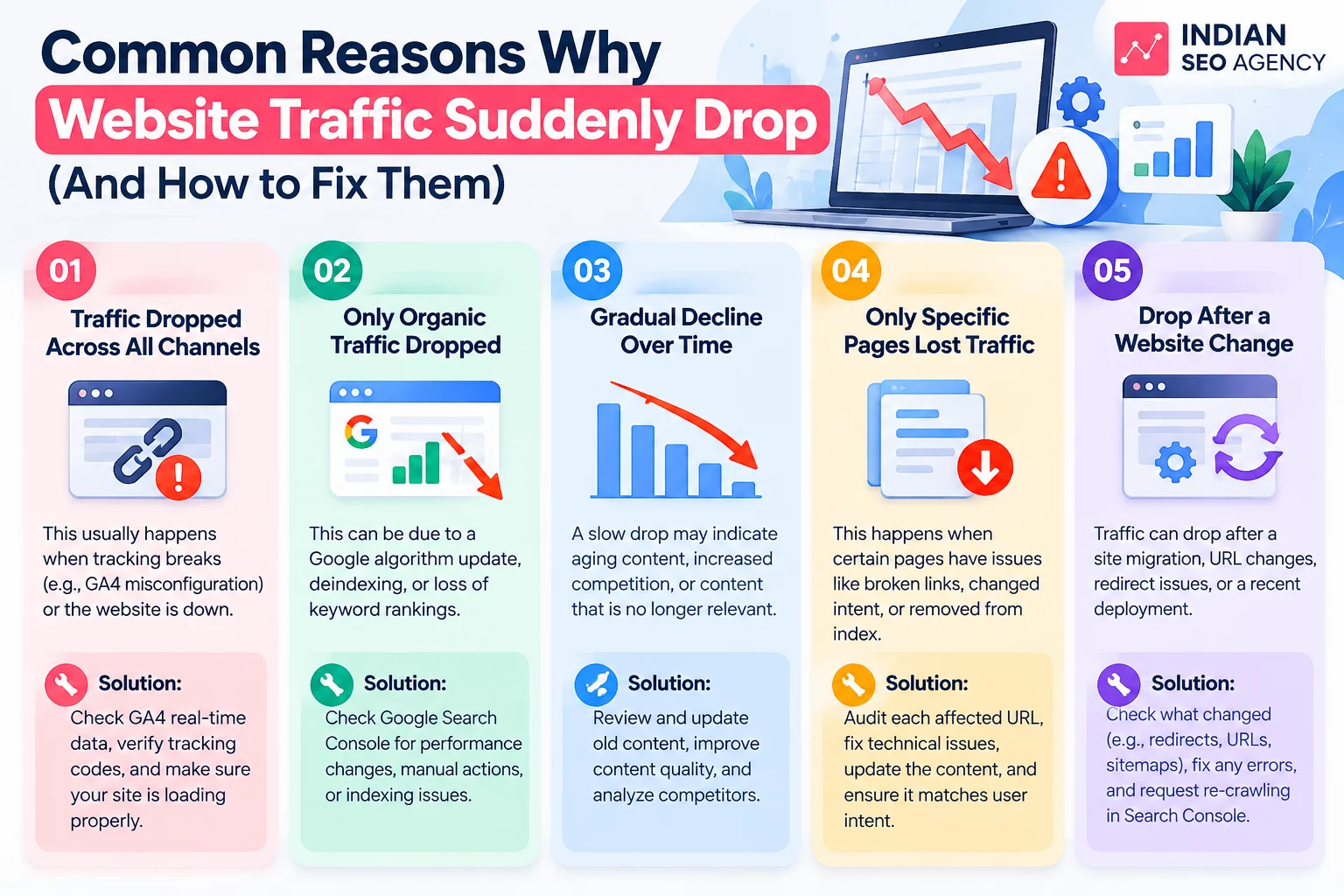
How to know why is my website losing traffic?
When you start to notice that the traffic of your website is decreasing, you will need to follow a specific order of checks rather than a single one on a dashboard. Each source illuminates a different aspect of the problem and going through them sequentially leads to an accurate diagnosis.
1. Check Google Analytics 4
The Realtime report in GA4 indicates if tracking is active or not. If there are active users on the site now, but there weren’t in the past, then there is a problem with the tracking code and you will need to address this before you do any further analysis. The Acquisition report subsequently reveals which channel (organic, direct, referral or paid) did acquire or lose visitors.
2. Log in to Google Search Console:
There are a few common reasons for a drop in organic traffic:
seasonality, competition, average position, technical issues, or problems with their brand reputation or AI Overviews grabbing clicks at the top of results. The Performance report is the most helpful for tracking which factor is at play as it excludes rankings changes from changes in click-throughs on the same query.
3. Determine which traffic channel has dropped.
The real story is masked by a sitewide number. The drop in GA4’s User Acquisition report highlights whether it’s a decline in organic search, or it’s also a decline in direct and referral traffic.
4. Before & After Performance
Compare the rankings on your website prior to and after the fall. If you compare the exact date of the fall with the window dates where updates have taken place, you can tell if the dates are the same for an algorithm update or sitewide.
5. Analyze the “Recent Website or SEO Changes” report.
A drop usually can be explained in a deploy log or a changelog from the CMS or the plugin. Common causes for redirects, canonical tags and robots.txt updates don’t appear in Search Console until the next crawl.
6. Check if the drop is sitewide or page specific.
If the loss is concentrated on a few pages, then the Search Console Performance report can be filtered to check which pages are being hit. A page specific drop points to a bug on that page, a sitewide drop to a structural bug.
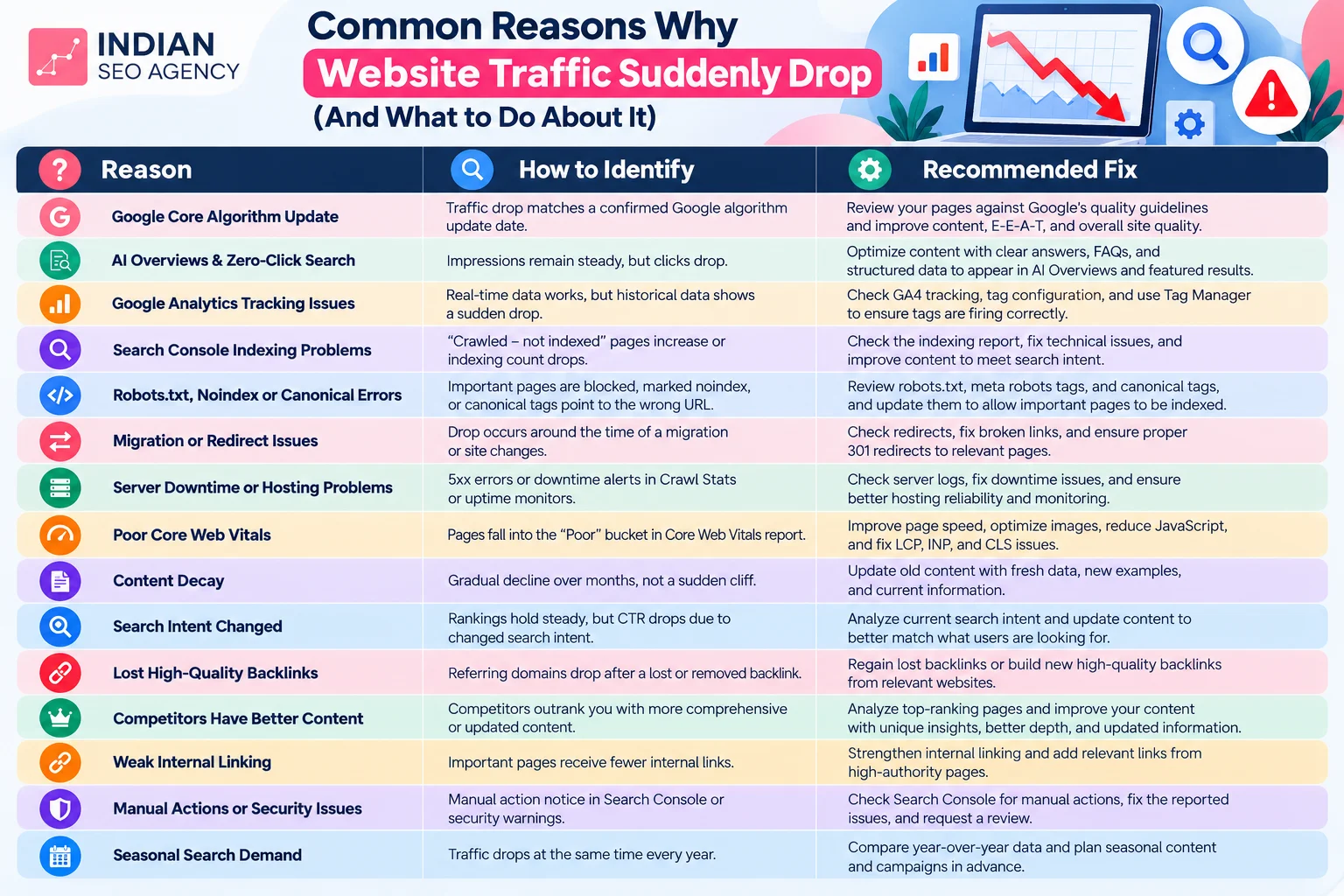
Here are 15 possible reasons why you suddenly lost traffic to your site—and how you can fix them.
There are several reasons why traffic to the website suddenly decreased, and each reason will leave behind a unique fingerprint in the data. There are 15 most common website traffic drop causes:
1. Google Core Algorithm Update
Google’s Core Update is a re-ranking of the quality of the content throughout the index. If you want to determine the drop dates for websites using this system-wide update, check the drop date when looking at Google’s update timeline on the Search Status Dashboard.
To overcome some of the website traffic loss due to the algorithm changes in Google, examine every page that has a decrease in traffic and focus on making changes to the pages that had the biggest loss. These results take weeks to develop. It’s also useful to take a closer look at the Google Algorithm Update Recovery process.
2. AI Formative & Summative Assessment
If the click count drops but the rankings are unchanged, it likely means that an AI-generated response is moving the user to the search intent.
To spot the reduced rankings of these channels, take the impressions figures from the site and compare them to the clicks in the Search Console. Check by making a manual search of the top queries for an AI Overview.
To recover from such a website traffic drop, re-optimisation of content is required through providing clear direct answers, structured data and E-E-A-T-compliant headings, so that the content can be pulled into AI answers. Content that meets customer intent, has comparisons and is decision-focused holds traffic better than simple definitions.
3. Broken Google Analytics Tracking Codes
If this is the case, it could be that traffic is never down. It recently ceased to report on your dashboard. To check this, go to GA4’s Realtime report. If you don’t see any historical charts of active users, this indicates that the tracking system is wrong.
The solution to this is to get going with Google Tag Manager and make sure that the GA4 tag is still firing. It can break silently when deployed or consented to recently. That’s why it’s useful to see the history of deployments around the traffic-down date to whittle down the cause quickly.
4. Site on Google’s Quality Checklist?
Once a website stops being indexed in Google’s index, it will not receive impressions from that search engine. This is done by examining and seeing if there is an increase in “Crawled, not indexed” URLs. The problem is normally confirmed using the URL Inspection tool.
It depends on the reason why it’s there to fix this issue. Thin pages require genuine content improvements prior to the submission. If there are crawl budget issues, it will require a cleaner sitemap and stronger internal links.
5. Robots.txt, Noindex or Canonical Errors
Check if there is any Disallow directive in your robots.txt, with the domain URL in the browser: yourdomain.com/robots.txt Disables crawlers from crawling the site. If you want to find out what is being indexed on the affected page or what is being detected as the canonical URL by the system then you can use a URL inspection.
This issue needs to be fixed in two places. Firstly, robots.txt needs to be updated either using the CMS SEO plugin or uploading through FTP. Secondly, there will be a need to fix the page header and settings of the plugin.
6. Website Migration / Redirects.
A website migration and redirect problem is a issue or misconfiguration that happens during the transfer of a website to a new domain, host or structure. To confirm this issue, you need to check the traffic decline from the GA4 Acquisition report and the date of the migration launch. Then the old URLs need to be checked using a tool such as Screaming Frog, to identify which are returning a 404 and which have not been correctly redirected. Correct solution is to simply configure all the old urls to their destination urls with redirect settings.
7. Downtime or hosting issues.
The first indicator as to whether Google can access the website is that the number of 5XX errors in the Crawl Stats report increases. Thus, these data need to be checked against the hosting uptime log or an external uptime monitoring tool such as UptimeRobot.
Fixing this issue depends on what is the reason behind the problem. The reasons could be: the need for more server power, CDN misconfiguration or plugin errors.
8. Bad Core Web Vitals & Page Experience
If Core Web Vitals are poor, it negatively influences search rankings as it indicates that visual elements and site loading speed are not stable. This negatively impacts on user satisfaction and increases bounce rates.
Solutions usually start from optimising images and browser caching, along with eliminating unnecessary code. Improving the speed of server response, using a CDN and specifying image dimensions to avoid layout shifts will help as well.
9. Content Decay & Outdated Information
Search engines tend to favour content that is new or up-to-date. As such, when the content is based on outdated data and has dead links, its authority will decrease. This will also affect the ranking of the website due to less visibility.
This can be remedied by updating the information with new information that is relevant to the current time. This should also be achieved with the help of keywords which have high search volumes and are naturally inserted into the content. Additionally, check out the user experience of websites and how it affects SEO, to get a better understanding of what keeps readers engaged with content.
10. Search Intent has changed.
Each visitor comes with a purpose of search, whether it is information, a transaction, or a particular page that they are looking for. As intent changes and pages don’t align with them, organic traffic and click through rates tend to decline.
To resolve this problem, search for new results with the target keywords. The next step is to update the headings and content to reflect the question(s) being asked.
Also Read: SEO for Small Business: The Complete Guide to Growing Your Business
11. Lost High-Quality Backlinks
When a website loses high-quality backlinks, its authority and trustworthiness are decreased. This often manifests itself in reduced visibility and loss of traffic to the problematic pages on the website.
Use an SEO audit tool to find out which backlinks are missing, after which you can ask for them to be reinstated if they’ve been deleted by accident. If these “links are not available, then use other active quality backlinks.” In addition, restoring this authority helps contribute directly to lead generation efforts because backlinks are likely to convert at a higher rate than cold organic clicks.
12. Competitors Have Better Content
If two pages are competing for the same position, the one with better content may rank higher because search engines seek to provide their users with the most valuable content. One of the primary reasons for the decrease in search traffic on existing pages was due to the improvement in competitors’ content. In order to address these instances, look for the competition keywords and record which pages now appear higher; compare word count, depth and updated data.
Fill that particular space rather than re-writing the entire page. Include some more of valuable information that may not be available to the competitor and reformulate the information to make it more readable.
13. Weak Internal Linking
If the internal link is weak, the crawlers will have a hard time indexing a site and see what it’s about. As a result, the page authority is impacted, and rankings tend to fall, too. These issues typically point to issues in the website structure.
But to remedy this, you need to make some modifications to your website. The first adjustment to be done is to include internal links that have descriptive anchor text. Second is creating navigation that reflects how the content relates to the reader. Read more about Semantic SEO to gain insight into how to better link and structure websites.
14. Manual Actions on Website
Rankings can change quickly if malware or hacked content or spam is found in a site. Google isn’t only going to punish the targeted pages. It signifies the entire domain. This is typically what you’ll see as traffic loss following a Google update. To bounce back from these lower positions, correct all the violations identified by Search Console that are directly related to the position of the webpage, and then enhance security throughout the webpage.
15. Search Volume, CPC & CTR Trends for the Season
Compare the drop in rank with the same timeframe a year ago in GA4. Then look for a drop in traffic on Google Trends for the same pattern to eliminate a calendar driven drop in traffic.
In a true seasonal situation, there is no work to be done on the site. The correct answer is to plan ahead for the next demand spike. You’ll also need to develop a digital marketing strategy that will handle readers’ intent properly.
Each cause links to a report to identify, and a tool or file to fix. This means that the following comparison table can be directly used for diagnostics.
Website Traffic Recovery Checklist:
- Google Analytics Verified
- Google Search Console Reviewed.
- Tracking Code Working
- Index Coverage Checked
- Robots.txt Verified
- Noindex & Canonical Checked
- XML Sitemap Updated
- Core Web Vitals Improved
- Backlinks Audited
- Internal Linking Improved
- Content Updated
- Search Intent Reviewed
- Competitor Analysis Completed
When is the best time to hire an SEO Expert?
Finding and fixing many of the causes listed in this guide can be done directly in Google Analytics and Search Console. But, in certain cases a more comprehensive and in-depth review is better.
Also Read: Top 5 SEO Agencies in Mississauga, Canada
Signs Your Website Needs Professional Help
When there are multiple peaks and valleys, it is possible there are multiple causes. If you have not been able to identify the real source after going through the data, opt for a structured audit by the best digital marketing agency.
A professional SEO audit offers several advantages.
Technical health is looked at along with content quality and backlinks as they are closely connected and a related review of the three mentioned areas will yield a better understanding of what a single one will not. Competitor Benchmarking reveals what pages their competitors are gaining more traffic for with the same keywords. This is where the relevance of an SEO consultant for small businesses comes into play, but in a scaled-down approach.
In what ways does Technical SEO and Content go together?
So even with a technically good site, it needs to be well-written to attract and keep the attention of visitors, and a well-written site can’t make up for a slow-to-load or substandard mobile site. In the same way, website User Experience (UX) will help the visitor to stay on a page once he/she has arrived.
Besides that, when considering the pros and cons of outsourcing a digital marketing firm versus your own in-house team, it becomes clear whether or not it’s the right choice.
Conclusion
There are often multiple causes of a traffic drop, such as an update, a broken GA4 tag and a page that was no longer optimized for search results. It’s important to get the diagnosis right rather than trying too quickly to fix a problem that doesn’t exist, because it’s a waste of time.
After the actual cause is determined, recovery is primarily a gradual process over several weeks. To get customized advice on how to optimize your site’s rankings, reach out to SEO Agency in India, such as a digital marketing or website development firm today.
Website Traffic Suddenly Dropped?
Find the reasons behind your traffic decline and get a data-driven SEO strategy to recover lost rankings, visitors, and organic traffic.