

Quick Answer: How to Delete Snapchat Account.
Steps of Deleting your Snapchat account:
- Visit the Snapchat Accounts Portal accounts.snapchat.com.
- Enter Snapchat user name and password.
- Click Delete My Account
- Enter your credentials once again and verify.
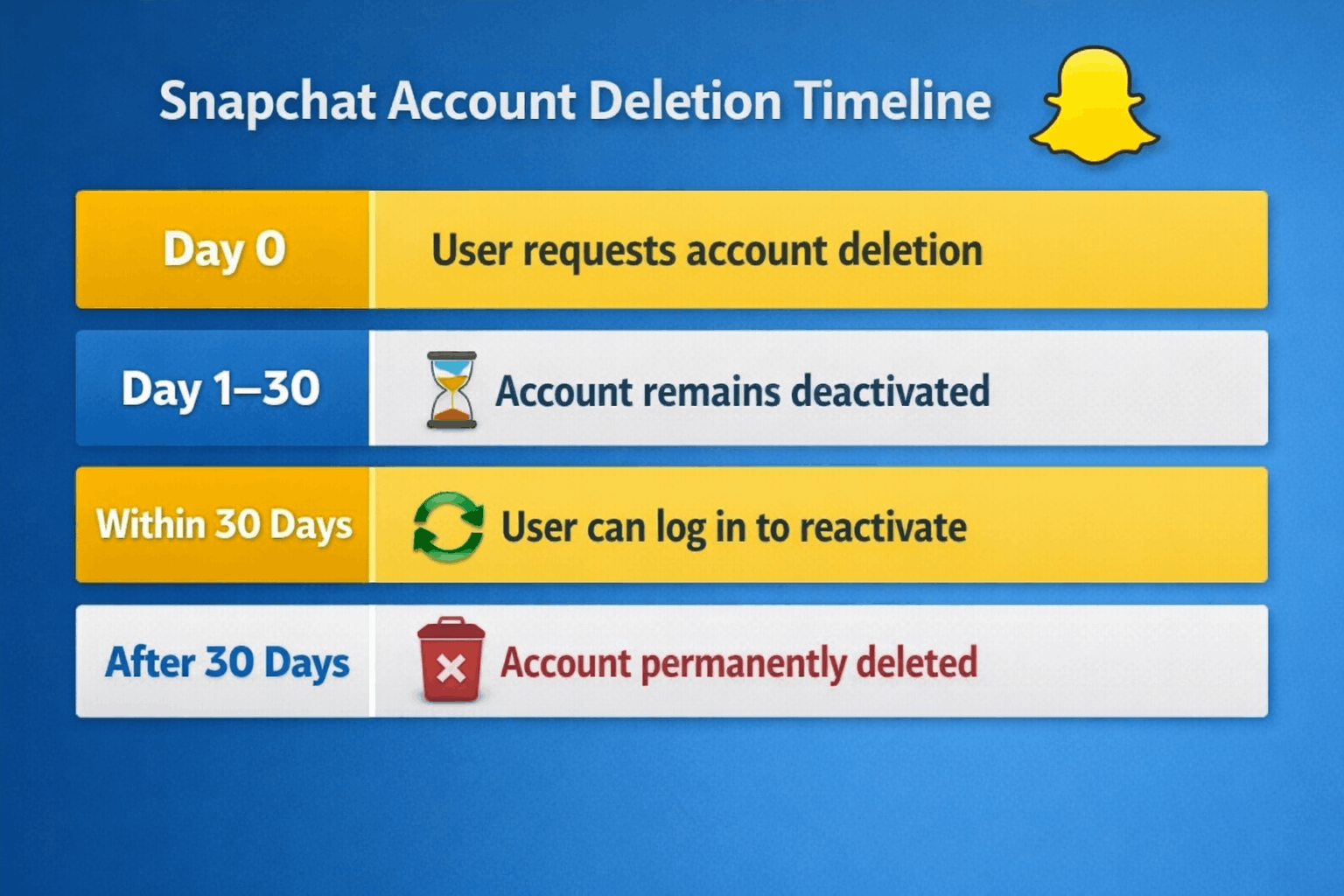
You will not be able to use your Snapchat account in 30 days. Failure to log in within this time will result in the deletion of the account and all the data.
Introduction: delete an account on snapchat
Snapchat is a social media platform that is widely used and the user can share snaps, stories, and messages in real-time. Nevertheless, you might come to the point when you will either deactivate your Snapchat account because of privacy issues, decreased social media use, or change to a different platform.
It is not just a matter of uninstalling the application but of deleting a Snapchat account, whereby after 30 days, the account is not deleted, allowing the user to have time to rethink their choice and delete the Snapchat account permanently.
This guide will teach you how to step by step delete your Snapchat account, what will occur after the deletion and how to restore your account within the 30-day grace period.
Key Takeaways:
The deletion of the Snapchat accounts should be done on the Snapchat Accounts Portal.
It is impossible to delete your Snapchat account in the mobile application.
- The account will stay frozen within 30 days and then be permanently deleted.
- When one logs back into the account within 30 days, the account is reinstated.
- Before they are deleted, users are supposed to download their Snapchat data.
How to delete Snapchat Account step-by-step.
To permanently delete your Snapchat account, follow the following steps:
 Step 1: Go to the Snapchat Accounts Portal.
Open a browser and visit the account management page on Snapchat:
accounts.snapchat.com
Step 2: Sign in to Your Snapchat Account.
Tap the Snapchat username and password to get to your account settings.
Step 3: Choose the option of deleting the account.
Go down the account settings and select Delete My Account.
Step 4: Confirm Your Identity
After deleting the account, Snapchat will require you to provide your username and password again to confirm a deletion request.
Step 5: File Deletion Request.
Once confirmed, your account will be disabled in 30 days and permanently deleted.
Will Deletion of Snapchat Account Be Noticed?
After you request the deletion of your account:
- Your profile is made invisible to the other users.
- You cannot be searched or contacted by friends.
- Your snap score, chats and stories are not visible.
Snapchat however holds the account under a 30 days deactivation period before being deleted permanently.
When you revisit your account during this period, you will automatically be reinstated to the account.
Snapchat Recovery Period 30 Days.
Snapchat offers a 30 days window after deletion of the account.
During this period:
- You will be able to re-activate your account by logging in.
- Your friends list and information are not lost.
- The deletion process is called off.
The account and all related information is irrevocably deleted after 30 days.
How to Save Snapchat Data before Deletion.
It is advisable to save your Snapchat information before you delete your account.
In order to download Snapchat Data, the following steps should be followed:
- Register to the Snapchat Accounts Portal.
- Click on My Data
- Choose information to be downloaded.
- Submit the request
A download link will be sent to your registered email by Snapchat.
This will enable you to store your snaps, chats, and activity of your account.
Questionnaire Before Removing Snapchat Account.
The steps to follow prior to deleting your Snapchat account are as follows:
- Send word to your friends or acquaintances.
- Save valuable snaps and photos.
- Save chat history if needed
- Check the privacy policy of Snapchat.
- Unsubscribe to any Snapchat+.
These measures will help you not to lose valuable information.
Also Read:
What Does the Yellow Heart Emoji Mean on Snapchat?
Reasons why people delete Snapchat Accounts.
Numerous users decide to get rid of their Snapchat accounts due to various reasons, such as:
Privacy Concerns
Other users would like to minimize their digital footprint and safeguard personal data.
Digital Detox
Removing social media accounts may also be beneficial in spending less time on screens and being more focused.
Platform Preference
Users can change to other social media sites that would be more appropriate.
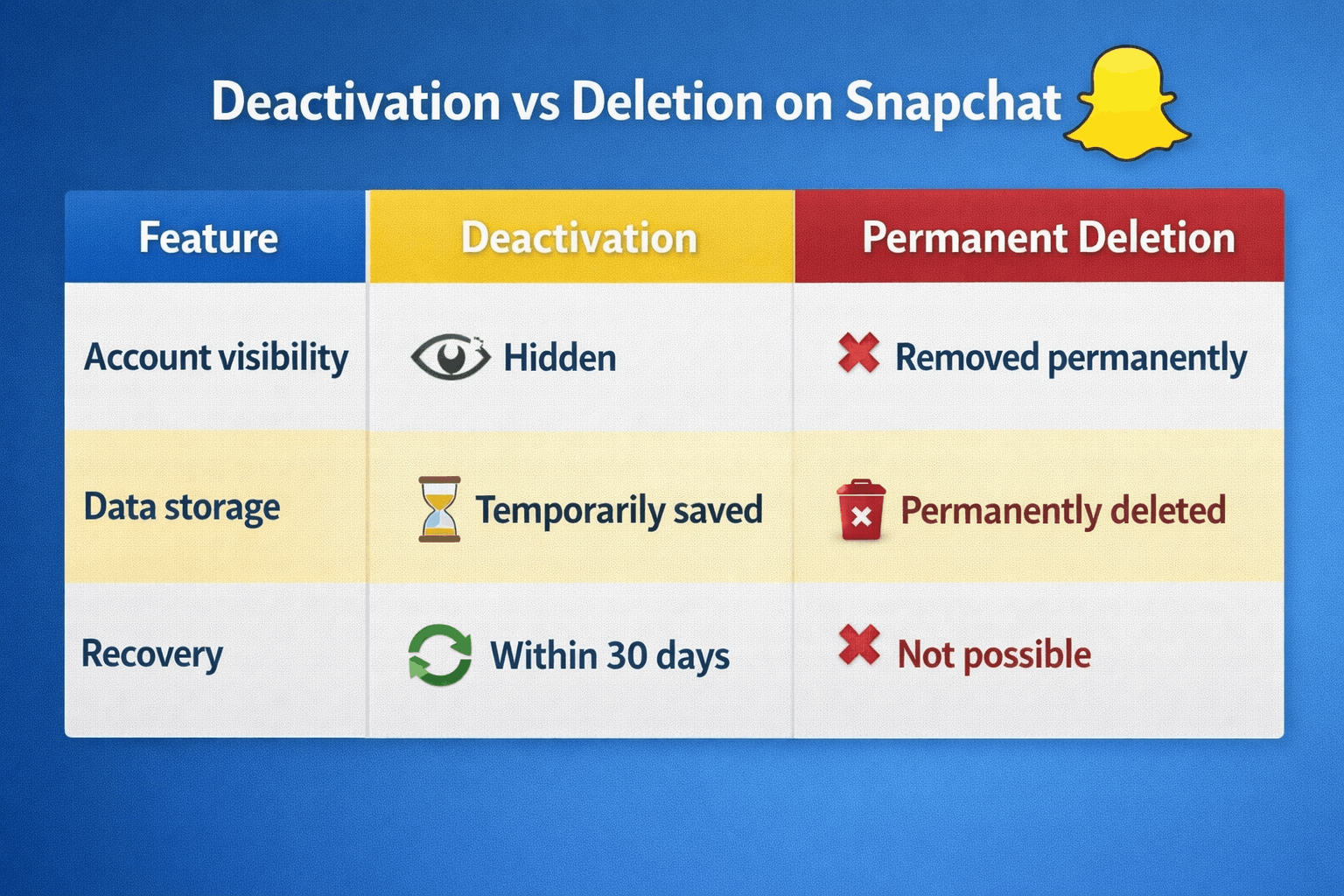
This difference can be understood to enable the user make an informed choice.
Problems that are likely to occur during the deletion of Snapchat accounts.
There are users who face difficulties when deleting.
Forgot Snapchat Password
Pressed the Forget Password option to reset your login credentials.
Unable to Find the Delete Button.
The delete feature can only be found on the Snapchat Accounts Portal, but not in the mobile app.
Two-Factor Authentication Problems.
Full authentication by the phone number registered or email.
Frequently Asked Question (FAQ)
Ques1. Is it possible to remove my Snapchat account on the application?
No. To delete the accounts, a user must do it on the Snapchat Accounts Portal with the help of a web browser.
Ques2. What is the time taken to delete an account in Snapchat?
The first one is a 30-day account deactivation followed by a permanent deletion in Snapchat.
Ques3. Is it possible to retrieve a deleted Snapchat account?
Yes. The account can be restored by logging in within the 30 days deactivation period.
Ques4. Will my pictures and messages be lost permanently?
Yes. Any account information such as snaps, chats and friends are permanently deleted after 30 days of grace period.
Ques5. Why will not I be able to delete my Snapchat account?
The majority of users have problems with this as they use the deletion option via the app rather than the Snapchat account portal.
Conclusion
The process of deleting a Snapchat account is rather simple, though one should comprehend how it works. The account is suspended at first to 30 days and the user is allowed to rejoin it in case of a change of heart.
It is important to remember to delete your account, download your data, and cancel subscriptions related to your account before deleting your account.
Using the measures that are provided in this guide, it is possible to permanently and safely delete your Snapchat account at any time.
Read more:
What are Two Ways Optimization Score can help Marketers Succeed
How often does Google Maps update?
How to Change YouTube Channel Name Without Losing Subscribers