

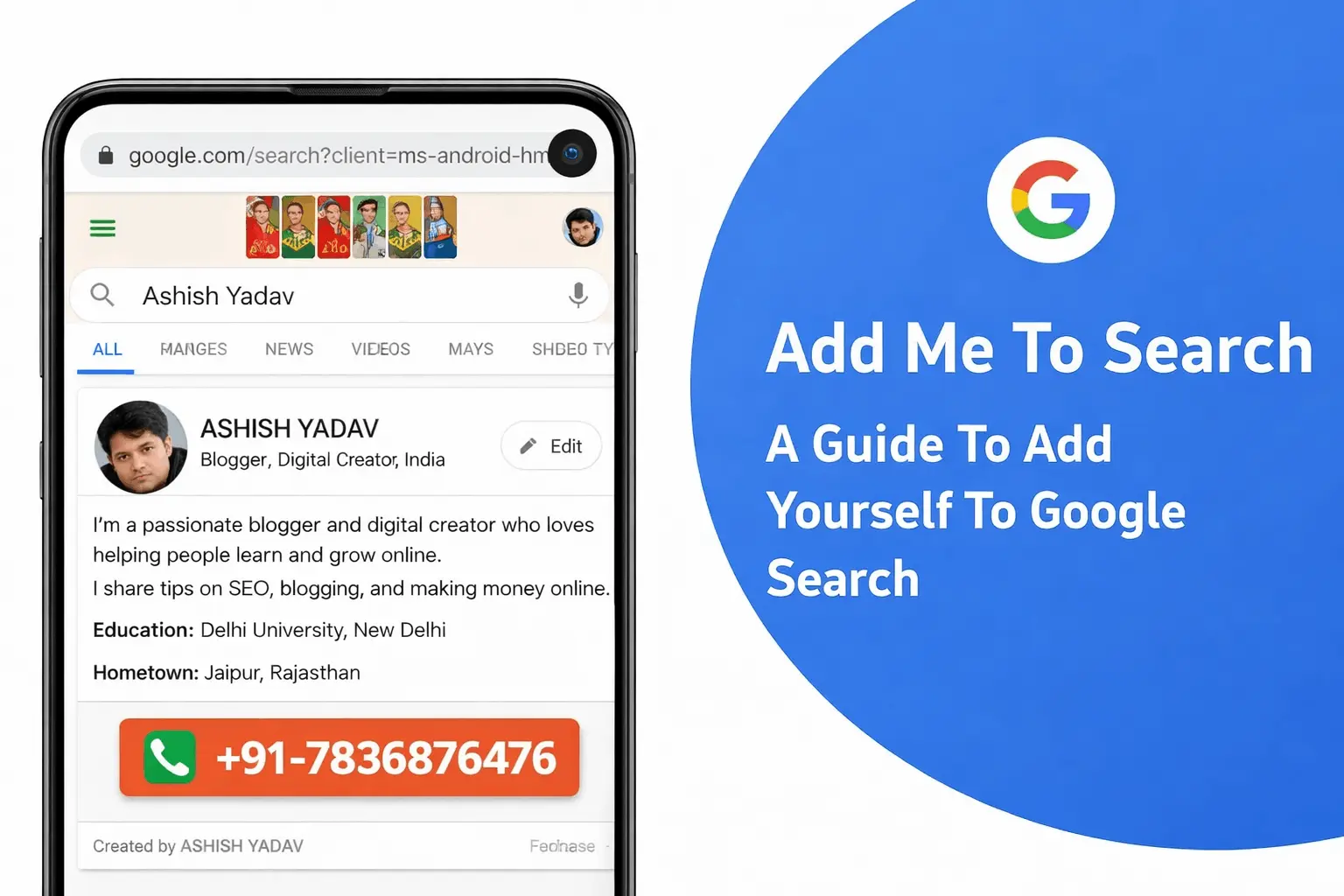
Key Takeaways: Add Me To Search
Add Me To Search is a Google feature that lets you create a personal profile (People Card) visible in search results. It assists you in developing your own brand and internet identity quickly.
- All you have to do is to create a Google account and have a mobile phone.
- Your profile can consist of your name, occupation, biography, location and social media.
- It is particularly handy among freelancers, SEO professionals, marketers and also job seekers.
- Your information has to be correct, full and updated to be visible in Google.
- Search visibility can be enhanced by the use of relevant keywords in your profile.
- This feature is currently mostly available in South Africa, Nigeria, India, and Kenya.
- You can also update or delete your People Card at any time on your Google account.
- The optimized Google People Card can make you visible to the clients, recruiters and businesses.
To add yourself to Google Search using Add Me To Search:
- Sign in to your Google account
- Search “Add Me To Search”
- Click on “Get Started”
- Enter your details like name, profession, and social links
- Save your profile
Once completed, your profile can appear when someone searches your name, helping you build your online presence and personal brand.
Introduction:
We are used to using Google to find out the names of famous people and prominent figures. The search results usually provide a concise view of the interests of the individual, their social media accounts, and the records of the individual that are public.
The “Add Me to Search” option on Google has made it possible for us. This feature allows easily promoting your company or personal Profile in search results. In this blog, we will be looking at all the things related to using the Add Me to Google tool in order to develop a virtual Google Search Card.
Google Search has a feature called “Add Me To Search” or “Add me to Google Search” that lets people create a personal profile visible to anyone who searches for their name.
The Profile will include the name, profile picture, work position, location and a link to their site, blog or any other Internet profiles. This feature requires one to have a working Google account, which could either be a Gmail account or a G Suite account.
To qualify as the Google People Card, one needs to have their full name, a recent profile image, occupation, their location, and their online presence links, as well as an overview of their skills and qualifications. This is meant to help people connect with each other since one can access relevant information about a person with ease. The person has a role of maintaining and updating his/her Google People Card so that the information presented is accurate and current.
What is the “Add Me To Search Google” feature?
Add Me To Search is a Google Search feature that lets individuals create a personal profile that appears when someone searches for their name. This Profile has their name, profile picture, job title, location and links to their site, blog or any other online profile. The Profile has to be linked to an active Google account, whether it is a Gmail address or a G Suite account.
The Profile has to contain the full name of the individual, a recent profile picture, job title, location, links to his or her online presence, and a summary of his or her skills and qualifications in order to be eligible. The aim of the Google People Card is to give the user the convenience of finding the necessary information about people and hence people find it easier to relate. The person is in charge of updating Google People Card and making sure that the information that is presented is correct and up-to-date.
What are the Advantages of including me in the search in Google?
There are several benefits that can be gained by adding yourself to Google Search using Google People Card, which include:
 Increased Visibility:
This can be done by having a Google People Card which will make you more visible online as people can easily find you by searching your name.
Professional Presence:
A Google People Card may be a business profile that showcases your experience, qualifications and skills making you more believable on the internet.
Connecting With Others:
It would be easy to incorporate links to your website, blog, or other online profiles and allow people to get in touch with you and learn more about you.
Better search results:
With the proper information in your Google People Card, you can enhance the quality of search results of your name and the user will find substantial information about you.
Control of online identity:
Through the establishment and maintenance of your Google People Card, you can have a say in what shows up in the search results when somebody searches your name, and this benefits you by having some say in the perceptions of yourself online.
Stunning Business Resume:
Your Google People Card is beautiful with desktop, laptop, tablet, and mobile platforms. It is easy to tailor, and the brand is search engine optimized giving an impressive profile.
Increased Presence:
To increase participation in a Google People Card, you can increase the browsing of your Profile by the consumers. This provides you with more opportunities to interact with other people and build connections.
Get Yourself Noticed by Employers:
Employers can easily find your Profile if you have the “Add Me to Search” option enabled on your Google profile. This helps them to easily employ you.
Improved Networking of Professionals:
Establishing a Google Add Me to Search profile allows you to grow your professional network quickly and effortlessly. There are more potential contacts and employers to whom you can connect.
Earn Google Certification:
In Google, Google Certifications are available in the field that you have through the Add Me to the Search option. This will advance your skills and make you competitive.
To conclude, creating a personal profile in Google Search is possible with the help of the Google People Card that will aid you in creating an online professional profile, networking with other people, and managing your online identity.
What you must know before making your own people card.
Before creating your Google People Card, it is necessary to keep in mind that only individuals in selected countries have Google accounts. You are required to give your complete name, profile picture, job title, address and links to your profiles on the internet. One should also consider the problem of privacy because the information given will be made available to anyone when they conduct a name search.
By keeping the truth and professionalism of your Profile safe, you should not post sensitive content, foul language, and foul pictures. Your duty is to keep and renew your People Card to be the right representation of you and your skills. The following are some of the most vital details you must know about building your own People card on the Google search:
Ensure that your Google account is on, and you are signed in.
- Visit Google Knowledge Panel self-service claim form.
- Enter your details, including name, profession, place and profile picture.
- Check your identity with the help of a postcard addressed to you or through Google.
- After this verification, your data will be displayed in Google search in the form of a People card.
- It can take weeks to go through the process and be different based on region.
How do I make an add me to Google search card?
One may want to know how to add me to Google Search. These are the right procedures that you can observe:
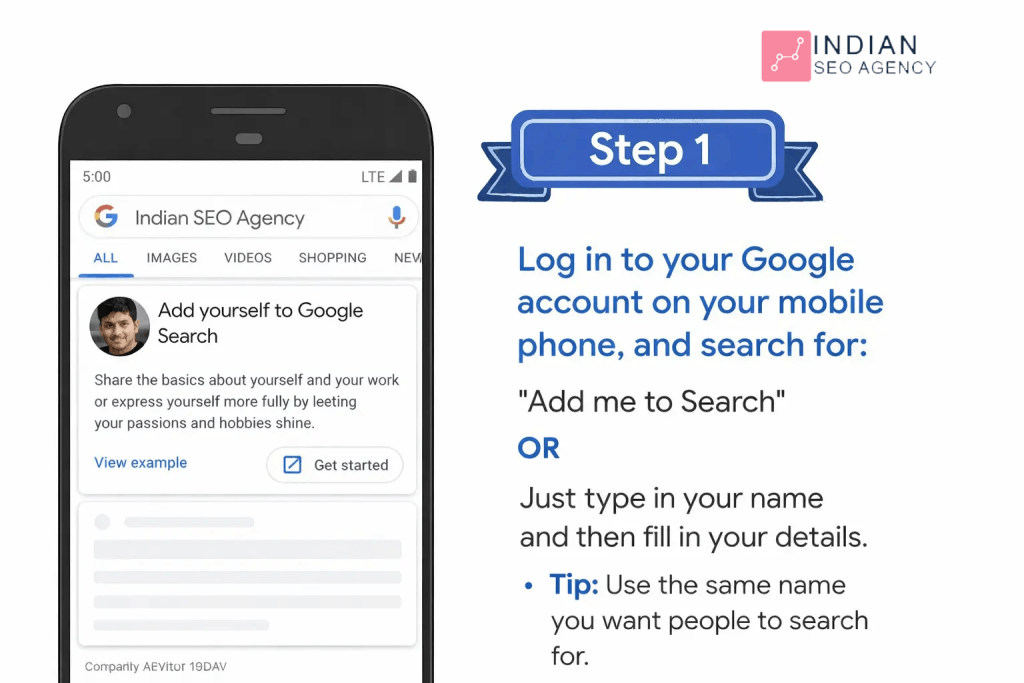
Step 1: Search “add me to search” or “Add me to Google” by typing the right keywords.
First of all, make sure that your language is changed to English and Hindi. Enter the search query “add me to search or add me to Google, and you should see the first option to create your people card. The other method would be to visit Google and open the Google search app now; enter add me to Google or edit my people card. You are supposed to locate the option and click on Get Started.
Step 2: Type the appropriate information in Google search card.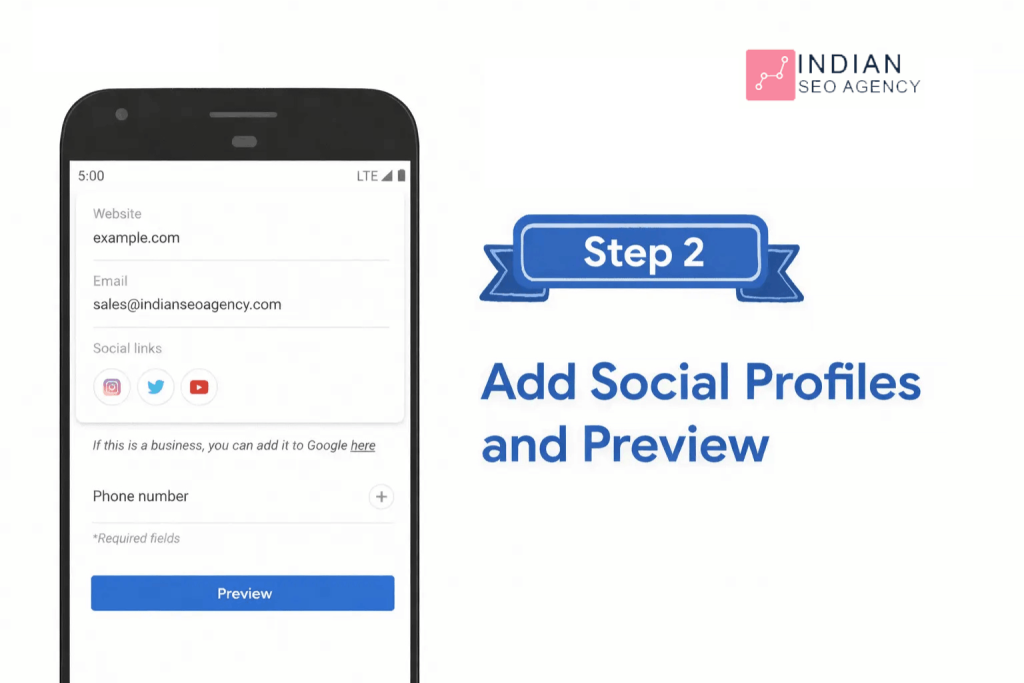
Now you are to begin filling in your information. First ones are name, location, about and job. Besides, you have the option of adding additional details. The following social profiles can also be added to add me to the search cards on Google:
- YouTube
- SoundCloud
Majority of the information is manually entered. The two exemptions however are the email and the phone numbers which Google automatically retrieves in your account. Therefore, you are only able to change your email address and phone number on the card when changing the same on your Google account.
Step 3: Preview and Submit the Card.
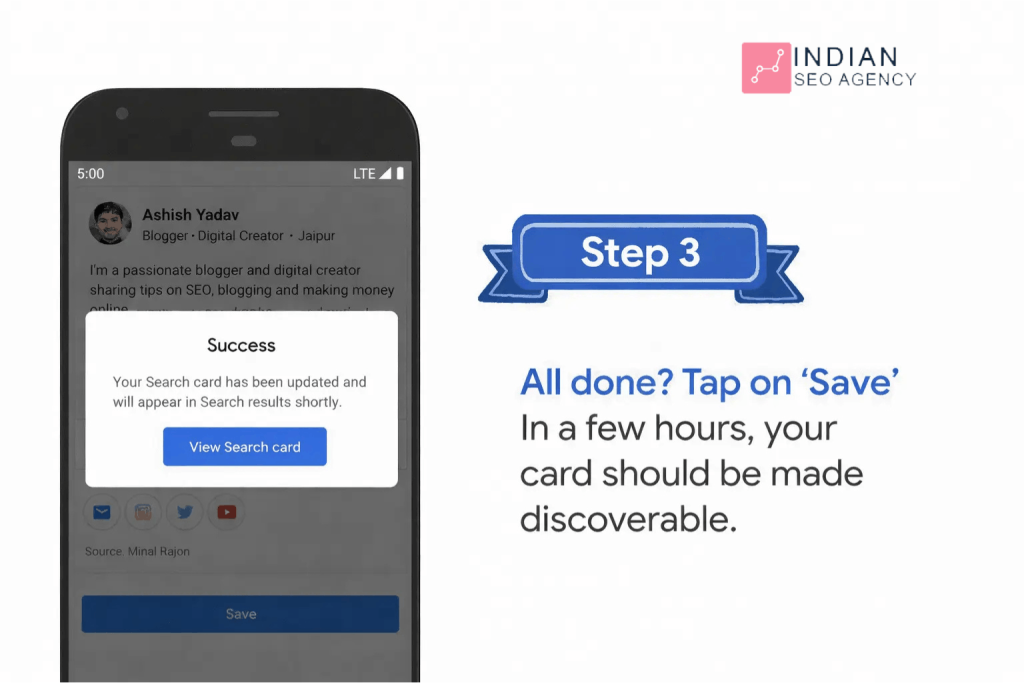
You are able to preview the card prior to its going live. Click Preview, which is at the bottom of the page. In case you are satisfied with the edition, save it and submit. It should be indexed in search engines.
It takes things to make a Google People Card:
One should have an active Google account, whether it is a Gmail address or a G Suite account, to generate a Google People card. This Profile must include your full name, recent profile picture of your face, your occupation or career, your address (city/town and country), links to your web site, blog or other online profiles and a description of your skills and qualifications. The following are the requirements to be eligible:
Google email address:
Your Profile should first be connected with the working Google account. A profile can be created using Gmail or G Suite account. You may create an account in account.google.com in case you do not have one.
Your name and a brief bio:
Your Profile should include your complete name. You may also add a nickname, in case you have it.
Profile image:
To have your Profile on Google People Card, you should have a Profile photo. Use an up to date photo which recognizes you.
Work title:
You are supposed to state your job or work title, and either an employed or a self employed person.
Location:
To facilitate easier locating of you, add the city/town, and country you are located to.
Links:
Direct links to your social media accounts or blog and your website should be added in case you have them. It will be easier to get people to follow you and know more about you.
Finally, add a brief description of your skills and qualifications in your Profile. After obtaining all the necessary information, submit your Profile to join Google People Card. You are able to update and manage your Profile.
What is the Google People Card? What to do When It is Not Working?
In case your Google people card is not functioning properly, you may follow the following steps:
- Ensure that your Google account is in good health, and address any problems.
- Make sure that you have filled-in your Google People card with your name, profile picture and contacts.
- Wait some hours or a day and once again search your name in Google. The changes on Google people cards are updated frequently and thus it might take time to reflect.
- In case you still do not see your card, you can try to log out of your Google account and search your name when you are not logged in.
In case your Google People card does not work after you have taken the above steps, you can seek the assistance of Google support. The needed contact information and support resources are available on Google people card site at https://www.google.com.
How to update the Google people card?
There are cases when you would like to be more delighted with the information that appears after adding yourself to Google search. Following a mere search of edit my people card, one need not go far as below and it should be of your convenience, say, how to add me to Google search Results, card information.
Step 1- Access the internet on your mobile phone. Sign in using your Google account, and enter the text edit my people card.
Step 2 – There is a button in the upper right that says Edit.
Step 3 – Lastly, edit the parts that you want to make some changes. You are able to view the Preview of the edited part. Satisfied with the changes, save them.
What is the way of Removing Email and phone numbers of Google people card?
In order to delete email and phone numbers on your Google People card, you should do the following:
- Go to Google search page and type your name. Your People Card ought to be found in the search results.
- Select the bottom button of your People Card which is the Edit button.
- Next to the contact information that you want to delete, there is a pencil icon that you should click.
- Erase what you would like to delete and press save.
- Check out the rest of your People Card and make sure it is correct and current.
- When you are ready with all the changes, then click on Publish, and save your changed People Card.
It is necessary to mention that your Google People Card is open and visible to all people who are searching your name. That is why it is crucial to present only the information that you are not ashamed of in front of the audience.
How to remove Google people card?
To remove your Google People card, follow the following steps:
Go to Google.com or Google Search App.
Sign up to your Google Account.
Go to search edit my people card.
To delete a card and its data on search results, select Remove my search card on Google.
Any information on your Google People card can be deleted and will no longer appear in search results or will be available to other people. When you want to form a new Google People card sometime in the future, you will be forced to begin afresh.
What Can You Do to make your Google people card more helpful?
Google people card will enable people to easily find and interact with you online. You can add all the information including email address, phone number, website and social media links to make your Google People Card more functional. Having the right information on your card will assist you to build and maintain relationships with other people.
Conclusion:
To sum up, becoming a Google search engine with the help of the Google People Card can be a positive step to making an online presence of mine professional. A Google People Card will also help you get more noticed and allow others to contact you more easily, by adding some information about yourself like your name, profile picture, job position, location, links to your online profiles, and a description of your skills and qualifications, and then, when they are searching your name, you will be found more easily.
Also, it is possible to control the information in the search results to preserve a favorable online image. To begin with, open an active Google account and post your Profile with all the needed information. Always remember to update your Profile so that people can see the information which is provided there is up to date. These steps will help you to gain control over what is available on the internet and have a positive influence on your career and personal life.
FAQs: Add Me To Search
1. What is Add Me To Search in Google?
Ans. Add Me To Search is a Google feature that allows individuals to create a virtual profile (People Card) that appears in Google search results when someone searches their name.
2. I would like to be added to Google Search.
Ans. To add yourself to Google Search, sign in to your Google account on mobile, search “Add Me To Search”, click Get Started, fill in your details, and save your profile.
3. Why is Add Me To Search not working for me?
Ans. It might fail, in case the option is not available in your area, your Google account is disabled, or your profile is not complete. Make sure that you have a mobile device and are logged in.
4. Is Add Me To Search free to use?
Ans. Yes, Add Me To Search is completely free. Any person possessing a Google account is able to create and manage his or her People Card at no cost.
5. What is the time taken to show on Google search?
Ans. Once you have made your People Card, it can take several hours to several days to come up in search results based on the indexing of Google and the completeness of your profile.
6. Is Add Me To Search discontinued?
Ans. Yes, Add Me To Search (Google People Card) has been officially discontinued by Google.
This feature was discontinued by Google between April and 2024.
It will no longer be possible to create or edit new People Cards.
The capability is no longer available and has been eliminated all over the world.
This has previously enabled users to create a personal profile on Google Search, which Google killed because of the lack of use, spam, and the current focus on improved search experiences.
7. What is the way to make my name appear in Google?
1. Create a Personal Website
Create a basic site with your name (e.g. yourname.com) and insert:
- About Me page
- Your profession
- Contact details
Google indexes sites so this is the most powerful strategy.
2. Make the most out of your LinkedIn page.
In the headline, please use your full name.
Insert keywords (SEO Expert, Digital Marketer, etc.)
Make your profile public
LinkedIn profiles usually appear on the first page of Google.
3. Develop Social Media Profiles.
Be active on platforms like:
Instagram
Facebook
Twitter (X)
Consist in the use of the same name.
4. Go with Google Business Profile (For Professionals).
If you provide services:
Establish a Google Business Profile.
Insert your name, services and location.
This helps to display your name in Google Search and Maps.
5. Publish Content Regularly
- Write blogs
- Write on Medium or other blogs.
- Get recognized on the other websites.
Pro Tip: Same name, profile photo and bio on all platforms would assist Google to identify you easily.
Also Read:
What are Two Ways Optimization Score can help Marketers Succeed
How often does Google Maps update?
Delete a Facebook Page (Step-by-Step Guide)
Top 10 AI Marketing Automation Tools